Articles by "Heavy Mods"

Tampilkan postingan dengan label Heavy Mods. Tampilkan semua postingan

Skybox Texture v2 for GTA SA Mobile GTAAM BLOGSPOT COM

Here is another cool sky box mod for GTA San Andreas Android. This mod contains new textures for sky, cloud, sun etc. It will change the graphics of GTA SA Mobile. The maker of this mod is "Guy Kamarov". All you have to do is add the textures in game files and then you can use this mod. There are no bugs and graphics look much vivid and better than default after installing this mod.
To install this mod please follow these steps:

Before You Start

• Computer is required to install this mod.
• To uninstall this mod, delete the moved folder.

Step I: Download Skybox Texture v2 for GTA SA Mobile

• Download Mod from:
  Google Drive
  or
  Mirror Link

• Download  TXD Fucker:
   Download TXD Fucker

Step II: Install this Mod in Your GTA SA Android

• Extract the downloaded mod (zip file).
• Extract your ".obb" file using winrar (Use computer). 
• Now run TXD Fucker and open this file
  /(extracted obb)/texdb/mobile/mobile.txt
• Click on Import > witht alpha and select all files inside "with alpha" folder.
• Again click on Import > without alpha and select all files inside "without alpha" folder.
• Exit and Copy below file and folder:
   /(extracted obb)/texdb/txd/ (this folder)
  and Paste them in your phone's:
  /Android/data/com.rockstargames.gtasa/files/texdb/             <here>
*Make new "files" and "texdb" folder if doesn't exist

Step III: Enjoy the mod

• Now run the game and enjoy the mod.


Screenshots

Skybox Texture v2 for GTA SA Mobile download gtaam net

Skybox Texture v2 2017 gtainsidefor GTA SA Mobile

new vivid sky best gta sa mobile android Skybox Texture v2 for GTA SA Mobile

Dark Crystal Script Mod Android guy kamarov 13

Today I am going to share a cool mod which will change the font in GTA San Andreas Android. The maker of this mod is "GuyKamarov13". This mod will replace the in-game font and also change its color. This mod requires a computer to install.
To install this mod please follow these steps:

Before You Start

• Computer is required to install this mod.
• To uninstall this mod, delete the moved files.


Step I: Download Dark Crystal Script Mod Android

• Download Mod from:
  Google Drive
  or
  Mirror Link

• Download  TXD Fucker:

Step II: Install this Mod in Your GTA SA Android

• Extract your ".obb" file using winrar. (PC).
• Now run TXD Fucker and open this file with it:
  /(extracted obb)/texdb/gta3/gta3.txt
• Click on Import > with alpha and select the two image files inside this mod.
• Exit and Copy below folder:
   /(extracted obb)/texdb/gta3/ (this folder)
  and Paste it in your phone's:
  /Android/data/com.rockstargames.gtasa/files/texdb/             <here>
*Make new "files" and "texdb" folder if doesn't exist

Step III: Enjoy the mod

• Now run the game and enjoy the mod.

Screenshots:

Dark Crystal Script Mod Android Download gtaam blogspot com

Highest Quality vegetation trees mod gta sa android mod pack download

The famous high quality textures mod pack for vegetation from Project Oblivion HQ is now available for GTA SA Android users. This is one of the most high quality textures mod pack with textures for trees, logs, grass, plants, shrubs, pine trees and even contains textures for stones, rocks and seaweeds. The maker of this mod pack is "YourCreatedHell" and it is ported to GTA SA Android by "Terima kasih". This mod pack is also featured in famous mod packs like "Cannibal Return". This mod pack contains more than 130 new high definition textures with improved models (approx. 50 dff files). Most of the vegetation is made from scratch with improved color vertices of objects. The mod is optimized for Android users so there will be less lag but you still need a good specifications phone to run this mod. Also, you need a computer to install this mod pack, because it requires importing textures. Which can only be done using a computer.
To install this mod pack please follow these steps:


Features:

• 100% of fixed geometry
• Highly detailed textures
• Replacement of almost all vegetation
• Correct color vertices
• Optimized for Mobile users


Before You Start

• Computer is required to install this mod pack.
• It contains lots of new high quality textures, so please make sure your device can handle them. It means you need a high specs device.
• To uninstall this mod pack, delete the files/folder you moved.

Step I: Download Behind Space of Realities 2013 Classic Version Android

• Download Mod from:
  Google Drive

• Download Alci's IMG tool:
   Download IMG Tool

• Download  TXD Fucker:
   Download TXD Fucker


Step II: Install this Mod in Your GTA SA Android

• Extract your ".obb" file using winrar. (PC). Click Here if you do not know how to extract ".obb" files of GTA San Andreas Android.
• Open IMG Tool you downloaded in step one and open "gta3.img" file using it. Which can be found by going to:
   /(extracted obb)/texdb/gta3.img
• Find and replace the ".dff" model files in this zip by going to "Actions>>Replace if exists" option and then selecting the ".dff" files. You can select all the "dff" files or add them one by one.
   then goto Commands>Rebuild Archive and then exit.
• Now run TXD Fucker and open this file with it:
  /(extracted obb)/texdb/gta3/gta3.txt
• Click on Import > with alpha and select all files inside "with alpha" folder.
• Exit and Copy below file and folder:
   /(extracted obb)/texdb/gta3.img (this file)
   /(extracted obb)/texdb/gta3/ (this folder)
  and Paste them in your phone's:
  /Android/data/com.rockstargames.gtasa/files/texdb/             <here>
*Make new "files" and "texdb" folder if doesn't exist

Step III: Enjoy the mod

• Run the game and enjoy this mod.

Screenshots:

Behind Space of Realities 2013 Classic Version Android Download


Behind Space of Realities 2013 Classic Version Android GTAAM guide

ultra hd dark blue water mod for gta sa android gtaam

New ultra HD textures of water and clouds for GTA San Andreas Android. The water will look more realistic and dark blue (like real sea water) and clouds will look more opaque and real. The maker of this mod is "Dollpran". This mod bring more color to GTA SA Android. You can also install Real Vegetation Mod with this mod to make your GTA SA Android look even more realistic. Computer is required to install this mod.
To install this mod please follow these steps:


Before You Start

• Computer is required to install this mod.
• To uninstall this mod, delete the moved files.

Step I: Download New Water and Clouds Textures Ultra HD Mod Android

• Download Mod from:
   Google Drive

• Download  TXD Fucker:
   Download TXD Fucker


Step II: Install this Mod in Your GTA SA Android

• Extract the downloaded mod (zip file).
• Extract your ".obb" file using winrar. (PC). Click Here if you do not know how to extract ".obb" files of GTA San Andreas Android.
• Now run TXD Fucker and open this file
  /(extracted obb)/texdb/txd/txd.txt
• Click on Import > witht alpha and select all files inside "with alpha" folder.
• Again click on Import > without alpha and select all files inside "without alpha" folder.
• Exit and Copy below file and folder:
   /(extracted obb)/texdb/txd/ (this folder)
  and Paste them in your phone's:
  /Android/data/com.rockstargames.gtasa/files/texdb/             <here>
*Make new "files" and "texdb" folder if doesn't exist

Step III: Enjoy the mod

• Run the game and enjoy the mod.

Screenshots:

Ultra HD clouds textures mod for gta sa android

Mitsubishi Lancer Evolution Car Mod Android

After lots of No Need Computer Mods here comes a heavy car mod from "RIZKY GAME". This car mod comes with custom paintjob thats why you need a computer. Because custom textures are not present in GTA San Andreas, so you have to add them seperately. The car has high quality textures both indoor and outdoor and looks like a sports car.  There are no bugs at this time. Do not forget to install "First Person While Driving Mod" with this car mod.
To install this mod please follow these steps:


Before You Start

• Computer is required to install this mod.
• To uninstall, delete the moved files.

Step I: Download Mitsubishi Lancer Evolution For Android

• Download Mod from:
  Google Drive

• Download Alci's IMG tool:
   Download IMG Tool

• Download  TXD Fucker:
   Download TXD Fucker


Step II: Install this Mod in Your GTA SA Android

• Extract your ".obb" file using winrar. (PC). Click Here if you do not know how to extract ".obb" files of GTA San Andreas Android.
• Open IMG Tool you downloaded in step one and open "gta3.img" file using it. Which can be found by going to:
   /(extracted obb)/texdb/gta3.img
• Find and replace the ".dff" model file in this zip by going to "Actions>>Replace if exists" option and then selecting the ".dff" files.
   then goto Commands>Rebuild Archive and then exit.
• Now run TXD Fucker and open this file with it:
  /(extracted obb)/texdb/gta3/gta3.txt
• Click on Import > with alpha and select all files inside "with alpha" folder.
• Click on Import > without alpha and select all files inside "without alpha" folder.
• Exit and Copy below file and folder:
   /(extracted obb)/texdb/gta3.img (this file)
   /(extracted obb)/texdb/gta3/ (this folder)
  and Paste them in your phone's:
  /Android/data/com.rockstargames.gtasa/files/texdb/             <here>
*Make new "files" and "texdb" folder if doesn't exist

Step III: Enjoy the mod

• Now run the game and enjoy the mod.

Screenshots:

Mitsubishi Lancer Evolution For Android by RIZKY GAME


Mitsubishi Lancer Evolution For Android

Hang Glider Jet Pack Mod Android Download GTAAM

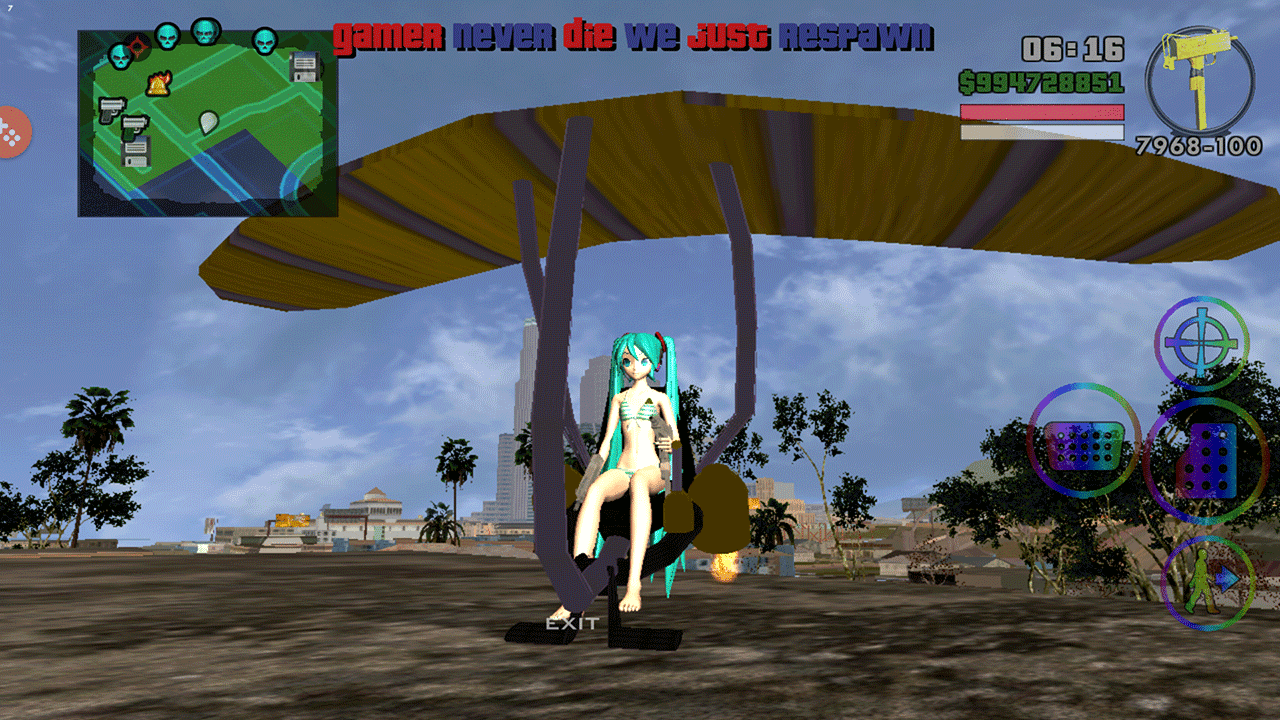
A new glider mod for GTA San Andreas Android which will replace Jetpack with Glider. The maker of this mod is "AleksGTA" and it has been ported to GTA SA Android by "karl chester". The mod works fine and has no bugs. This is a heavy mod, means you need a computer to install this mod.
To install this mod please follow these steps:


Before You Start

• You need a computer to install this mod.
• To uninstall simply delete the moved files.

Step I: Download Hang Glider Jetpack Mod GTA SA Android

• Download mod from:
   Google Drive

• Download Alci's IMG tool:
   Download IMG Tool

• Download  TXD Fucker:
   Download TXD Fucker

Step II: Install this Mod in Your GTA SA Android

• Extract your ".obb" file using winrar. (PC). Click Here if you do not know how to extract ".obb" files of GTA San Andreas Android.
• First of all move the "anim" folder to:
  /Android/data/com.rockstargames.gtasa/files/           <here>
*Make new "files" folder if doesn't exist
• Open IMG Tool you downloaded in step one and open "gta3.img" file using it. Which can be found by going to:
   /(extracted obb)/texdb/gta3.img
• Find and replace the ".dff" model file in this zip by going to "Actions>>Replace if exists" option and then selecting the ".dff" files.
   then goto Commands>Rebuild Archive and then exit.
• Now run TXD Fucker and open this file with it:
  /(extracted obb)/texdb/gta3/gta3.txt
• Click on Import > with alpha and select all files inside "with alpha" folder.
• Exit and Copy below file and folder:
   /(extracted obb)/texdb/gta3.img (this file)
   /(extracted obb)/texdb/gta3/ (this folder)
  and Paste them in your phone's:
  /Android/data/com.rockstargames.gtasa/files/texdb/             <here>
*Make new "files" and "texdb" folder if doesn't exist

Step III: Enjoy the mod

• Run the game and enjoy the mod.

Screenshots:

Hang Glider Jetpack Mod Android screenshots


new Hang Glider Jetpack Mod Android

New Rim Pack for GTA SA Android by ducati and sigilohq

GTA San Andreas has some cool modifications for vehicles but due to low textures and low poly models those modifications look really bad. Similarly if you install rims in your cars you will notice that they have very low quality. Which makes your car look really bad. To fix this issue the modder "SigiloHQ" has ported a rim pack for GTA San Andreas Android. The maker of this mod is "Ducati996" and "SigiloHQ" has ported it for GTA SA Android. This new rim pack contains new rims for all vehicles including sports, classic, muscle and off road rims. The quality of rims is really high which when used with custom Car Mods make it really great. Another good thing about this mod is it supports "ENR Mod", which add supports for reflection in rims. There are 17 rims in this mod but if you don't like them you can add textures present inside "Texturas Alternativas" folder. Also note that this mod requires computer and cleo Android to install and work.
To install this mod please follow these steps:

Before You Start

• Cleo Android is required to run this mod.
• Textures inside "Texturas Alternativas" folder are extra textures which should be added only if you do not like installed rims.
• There are two types of ".dff" files inside this mod pack. One is with ENR and one is without ENR. ENR is just a reflection mod (ultra reflections). So install any one ".dff" files!
• To uninstall, simply delete the moved files.


Step I: Download New Rim Pack Mod for GTA SA Android

• Download Mod from:
   Google Drive

• Download Alci's IMG tool:
   Download IMG Tool

• Download  TXD Fucker:
   Download TXD Fucker

• Download Cleo Android:

  Download Cleo Android


Step II: Install this Mod in Your GTA SA Android

• Extract the downloaded mod (zip file).
• Move the ".csi" and ".fxt" files to:
   /Android/data/com.rockstargames.gtasa/      <here>
• Now extract your ".obb" file using winrar. (PC). Click Here if you don't know how to extract "obb" files.
• Open IMG Tool you downloaded in step one and open "gta3.img" file using it. Which can be found by going to:
   /(extracted obb)/texdb/gta3.img
• Find and replace all the ".dff" model files in this zip by going to "Actions>>Replace if exists" option and then selecting the ".dff" files (inside "gta3.img" folder. Or if you want rims with reflections than go to "ENR" folder instead of "gta3.img" folder)
   then goto Commands>Rebuild Archive and then exit.
• Now run TXD Fucker and open this file with it:
  /(extracted obb)/texdb/gta3/gta3.txt
• Click on Import > without alpha and select all files inside "without alpha" folder.
• Exit and Copy below file and folder:
   /(extracted obb)/texdb/gta3.img (this file)
   /(extracted obb)/texdb/gta3/ (this folder)
  and Paste them in your phone's:
  /Android/data/com.rockstargames.gtasa/files/texdb/             <here>
*Make new "files" and "texdb" folder if doesn't exist

Step III: Enjoy the mod

• The mod is installed. Now run the game and enjoy new rims. And if you ever get bored with rims than add the textures inside "Texturas Alternativas" to "gta3.img". It will replace the rims with new rims.

Screenshots:

New Rim Pack for Android from gtaam


New Rim Pack for GTA San Andreas Android

DongFeng SX Military truck android download from gtaam.net

DongFeng SX Military Truck 6x6 mod is now available for GTA San Andreas Android. This mod will replace the Barracks Military Truck with Dong Feng SX 6x6 Military Truck. The maker of this mod is "VindiCaToR" and "gtaam.net" has ported it for  GTA SA Android. A 5 ton 6x6 special duty heavy truck. The mod works fine in GTA San Andreas Android. It will replace Barracks Military truck. You can use Car Spawner Mod to spawn this truck. It comes in two variants. One with roof and the other without roof. After installing this mod if the tires are white in color than please note that it is not a bug. It is due to reflection. Setting game reflections to low will fix this issue. You can do this by going to in game Settings>>Display. I hope you like this mod.


Before You Start

• Computer is required to install this mod.
 • You can use Car Spawner Mod to spawn "Barracks" truck (and you will see this new truck).
• To uninstall simply delete the moved files.

Step I: Download DongFeng SX Military Truck Mod and Tools

• Download Mod from:
   Google Drive

• Download Alci's IMG tool:
   Download IMG Tool

• Download  TXD Fucker:
   Download TXD Fucker


Step II: Install this Mod in Your GTA SA Android

• Extract the downloaded mod (zip file).
• Now extract your ".obb" file using winrar. (PC). Click Here if you don't know how to extract "obb" files.
• Open IMG Tool you downloaded in step one and open "gta3.img" file using it. Which can be found by going to:
   /(extracted obb)/texdb/gta3.img
• Find and replace the ".dff" model in this zip by going to "Actions>>Replace if exists" option and
   then goto Commands>Rebuild Archive and then exit.
• Now run TXD Fucker and open this file with it:
  /(extracted obb)/texdb/gta3/gta3.txt
• Click on Import > with alpha and select all files inside "with alpha" folder.
• Click on Import > without alpha and select all files inside "without alpha" folder.
• Exit and Copy below file and folder:
   /(extracted obb)/texdb/gta3.img (this file)
   /(extracted obb)/texdb/gta3/ (this folder)
  and Paste them in your phone's:
  /Android/data/com.rockstargames.gtasa/files/texdb/             <here>
*Make new "files" and "texdb" folder if doesn't exist

Step III: Enjoy the Mod

• Now just run the game and find that truck. You will see the new one. You can also use "Car Spawner Mod" to spawn this truck instantly.

Screenshots:

[REL] DongFeng SX Military Truck For GTA SA Android download from gtaam by vindicator285


[REL] DongFeng SX Military Truck For GTA SA Android

APB Weapons Pack by VindiCaTor for Android GTAAM

A Sci-Fi weapon pack for GTA San Andreas Andorid by the famous mod maker "Vindicator". The maker of this mod is "VindiCaToR" and it has been ported to Android by "GTAAM.net". This mod pack contains15 new modern weapons. The quality of the textures is not much good but its not bad either. Currently there are only two bugs, UZI is white and AK47 is not working. There are no bugs other than this. This mod also comes with custom weapon icons. But the problem is those icons are not available for all the weapons. As the mod has only few weapons thats why only those weapons have custom icons.
To install this mod please follow these steps:


Before You Start

• Computer is required to install this mod.
• To uninstall simply delete the moved files.


Step I: Download APB Weapons Pack by VindiCaTor Android

• Download Mod from:
  Google Drive

• Download Alci's IMG tool:
   Download IMG Tool

• Download  TXD Fucker:
   Download TXD Fucker


Step II: Install this Mod in Your GTA SA Android

• Extract the downloaded mod (zip file).
• Now you need computer!!!
• Extract those two ".obb" files. (data files, which can be found by going to: /Android/obb/com.rockstargames.gtasa/    <here> )
• Open TXD Fucker and click open.
• Now open the "gta3.txt" file by going to:
 /Location where you extracted the two .obb files/texdb/gta3/gta3.txt            <here>
• Click Import with alpha and choose all the files inside "with alpha" folder (downloaded mod).
• Now again click import but this time choose Without Alpha option and import all the textures  placed inside "without alpha" folder (of downloaded mod).
• CLICK YES IF IT ASK TO REPLACE FILES!
• After replacing is done close txd fucker and move the "gta3" folder (from extracted obb location) to:
  /Android/data/com.rockstargames.gtasa/files/texdb/         <here>

• Now we have to Import ".dff" files to "gta3.img" using IMG tool.
• To import dff files we will use ALCI's IMG EDITOR. Follow this method.
• Open Alci's img editor.
• Now click File>>Open and choose "gta3.img" file. This file can be found by going to:
  /Location where you extracted the two obb files/texdb/      <here>
• Now go to Actions>>Import. Now choose all the ".dff" files inside downloaded mod.
• Replace files if it asks....
• Now go to Actions>>Rebuild.
• After Rebuilding is done! close the img editor and move the "gta3.img" file to:
  /Android/data/com.rockstargames.gtasa/files/texdb/         <here>


Step III: Enjoy the mod

• Run the Game and enjoy the mod.


Screenshots:

APB Weapons Pack by VindiCaTor for Android


APB Weapons Pack by VindiCaTor for Android

GTA V Vapid Peyote Batmobile 66 car mod android download gtaam

The famous two door luxury car of GTA V is now available in Batman Edition for GTA San Andreas Android. The maker of this mod is "Automan". This mod will replace Voodoo car with Vapid Peyote Batmobile. This car is present in GTA V but it is now available for GTA San Andreas Android. After installing this mod just use car spawner mod to spawn Voodoo car and you will see this car. The car has no bugs. Works flawlessly!!
To install this mod please follow these steps:


Before You Start

• Computer is required to install this mod.
 • You can use Car Spawner Mod to spawn "Voodoo" car (and you will see this new car).
• To uninstall simply delete the moved files.


Step I: Download GTA V Vapid Peyote Batmobile 66 Android

• Download Mod from:
  Google Drive

• Download Alci's IMG tool:
   Download IMG Tool

• Download  TXD Fucker:
   Download TXD Fucker


Step II: Install this Mod in Your GTA SA Android

• Extract the downloaded mod (zip file).
• Extract your ".obb" file using winrar. (PC). Click Here if you do not know how to extract ".obb" files of GTA San Andreas Android.
• Open IMG Tool and open
   /(extracted obb)/texdb/gta3.img
• Find and replace the ".dff" model in this zip  and
   then goto Commands>Rebuild Archive and then exit.
• Now run TXD Fucker and open this file
  /(extracted obb)/texdb/gta3/gta3.txt
• Click on Import > without alpha and select all files inside "without alpha" folder.
• Exit and Copy below file and folder:
   /(extracted obb)/texdb/gta3.img (this file)
   /(extracted obb)/texdb/gta3/ (this folder)
  and Paste them in your phone's:
  /Android/data/com.rockstargames.gtasa/files/texdb/             <here>
*Make new "files" and "texdb" folder if doesn't exist


Step III: Enjoy the mod

• Run the Game and enjoy the mod.


Screenshots:

GTA V Vapid Peyote Batmobile 66


GTA V Vapid Peyote Batmobile 66 download by automan

Author Name

Formulir Kontak

Nama

Email *

Pesan *

Diberdayakan oleh Blogger.