Hakuchou Bike Mod GTA San Andreas Android

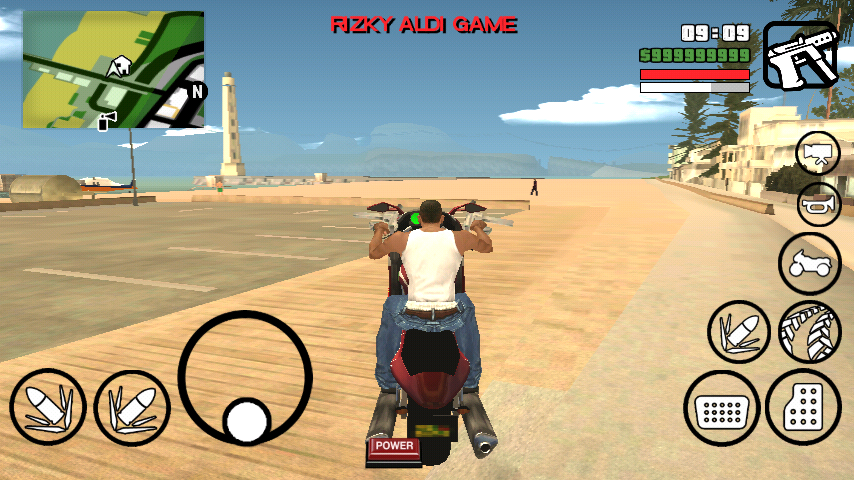
"This super-fast sports bike can take you from zero to permanent vegetative state in under two and a half seconds. It's not a question of if this bike will kill you, but when, so pay up, and live dangerously" this is written on the description of this bike in GTA V. This mod will replace the "NRG-500" bike with Hakuchou Bike present in GTA V. The maker of this mod is "RIZKY GAMER". This is only "dff" version, means it does not require computer to install.
To install this mod you have to follow these steps:
Before You Start
• If you don't have PC then you can install this mod with "img tool android" software (free in playstore). Steps are same. CLICK HERE to know how to use img tool android to install this mod (no need pc).
• To uninstall this mod, delete the moved files.
• To uninstall this mod, delete the moved files.
Step I: Download Hakuchou Bike Mod Android
• Download this mod from:
Google Drive
or
Mirror Link
• Download IMG tool (Android)
Download IMG Tool Android
• Download Alci's IMG tool:
Download IMG Tool
Step II: Install this Mod in Your GTA SA Android
• If you don't have PC. You have to follow "img tool Android tutorial"! do not follow below steps!
And if you have PC you can follow these steps:
• Extract the downloaded mod (zip file).
• Now extract your ".obb" file using winrar. (PC).
• Open IMG Tool and open
/(extracted obb)/texdb/gta3.img
• Find and replace the two ".dff" files in this zip and
then goto Commands>Rebuild Archive and then exit.
• Now copy below file:
/(extracted obb)/texdb/gta3.img (this file)
and Paste it in your phone's:
/Android/data/com.rockstargames.gtasa/files/texdb/ <here>
*Make new "files" and "texdb" folder if doesn't exist
And if you have PC you can follow these steps:
• Extract the downloaded mod (zip file).
• Now extract your ".obb" file using winrar. (PC).
• Open IMG Tool and open
/(extracted obb)/texdb/gta3.img
• Find and replace the two ".dff" files in this zip and
then goto Commands>Rebuild Archive and then exit.
• Now copy below file:
/(extracted obb)/texdb/gta3.img (this file)
and Paste it in your phone's:
/Android/data/com.rockstargames.gtasa/files/texdb/ <here>
*Make new "files" and "texdb" folder if doesn't exist
Step III: Enjoy the mod
• Now run the game and enjoy the mod.
Screenshots:


![Future Boss Bike Mod GTA SA Android [NO PC]](https://blogger.googleusercontent.com/img/b/R29vZ2xl/AVvXsEj5u0KnQ_KJJzjAUQC6ARGdvK8ghzzvstaO2gSPYC1KfJJZT9lrV5e93f1lvOmZaNGhYsa1TsL9tRSohAOrTqrL8w5wY5Hai96FezX76Imlg7V9JFClcTRjyeRDTK9VU2imw1oczCfnFL2I/s1600/2016+-+1.jpg)